

A reset becomes more stressful when you are already abroad. The phone may contain airline tickets, local SIM details, banking apps, maps, and two-factor authentication. If the device really must be erased, the safest plan is to protect account access first and rebuild the essentials in a controlled order afterwards.
Prepare before resetting abroad
If the phone is still accessible, back up photos and documents, check which Google and HUAWEI ID accounts are signed in, and make sure recovery email addresses or phone numbers still work. Save booking references and important contacts somewhere outside the phone.
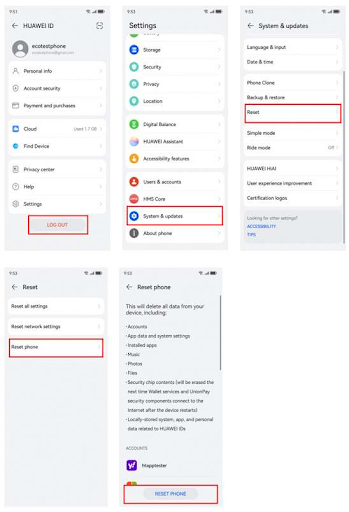
Huawei’s built-in factory-reset path is Settings > System & updates > Reset > Reset phone. It erases accounts, app data, settings, installed apps, and files stored internally. A reset should not be started in the middle of a trip unless you know how you will sign back in.
If the screen lock is forgotten
Huawei support provides a Recovery mode reset for owners who cannot remember the lock-screen password. The button sequence can vary, but many models enter Recovery by holding Power and Volume Up during startup. From there, choose the clear-data or factory-reset option.
That gets the phone erased, but it may still request HUAWEI ID or the previously synced Google account after restarting. The reset and the activation check are separate steps.
Recover access before looking for shortcuts
If the requested Google account is yours, use Google’s official recovery options. If the device asks for a HUAWEI ID, reset that password through Huawei. For a used phone, the previous owner should remove it from their account before you rely on the device abroad.
Avoid remote services that promise to remove the account check in minutes. If legitimate ownership can be documented, Huawei support or an authorised service centre is the appropriate escalation path.
Rebuild the overseas app setup
After activation, restore only the apps you need first: banking, maps, transport, messaging, airline, hotel, and authentication apps. The Huawei Community page linked through how to reset huawei phone without google account can help with Google-related setup and troubleshooting after the phone is usable again.
For travellers searching how to reset huawei phone without google account, the safest answer is practical rather than clever: erase only when necessary, recover the correct account, and rebuild the phone from trusted sources before leaving reliable Wi-Fi.